
Video or audio, not one merged movie.
MP4 keeps video and audio together per item. MP3 creates audio files. Original audio keeps supported source audio without another lossy encode. A playlist is not automatically joined into one file.
One playlist · Separate local files
Paste a playlist link once, choose video or audio, and let VODForge process the items one at a time. Follow the batch in Forge, then browse the saved playlist in your Library.
Free desktop app · MIT licensed · No desktop account
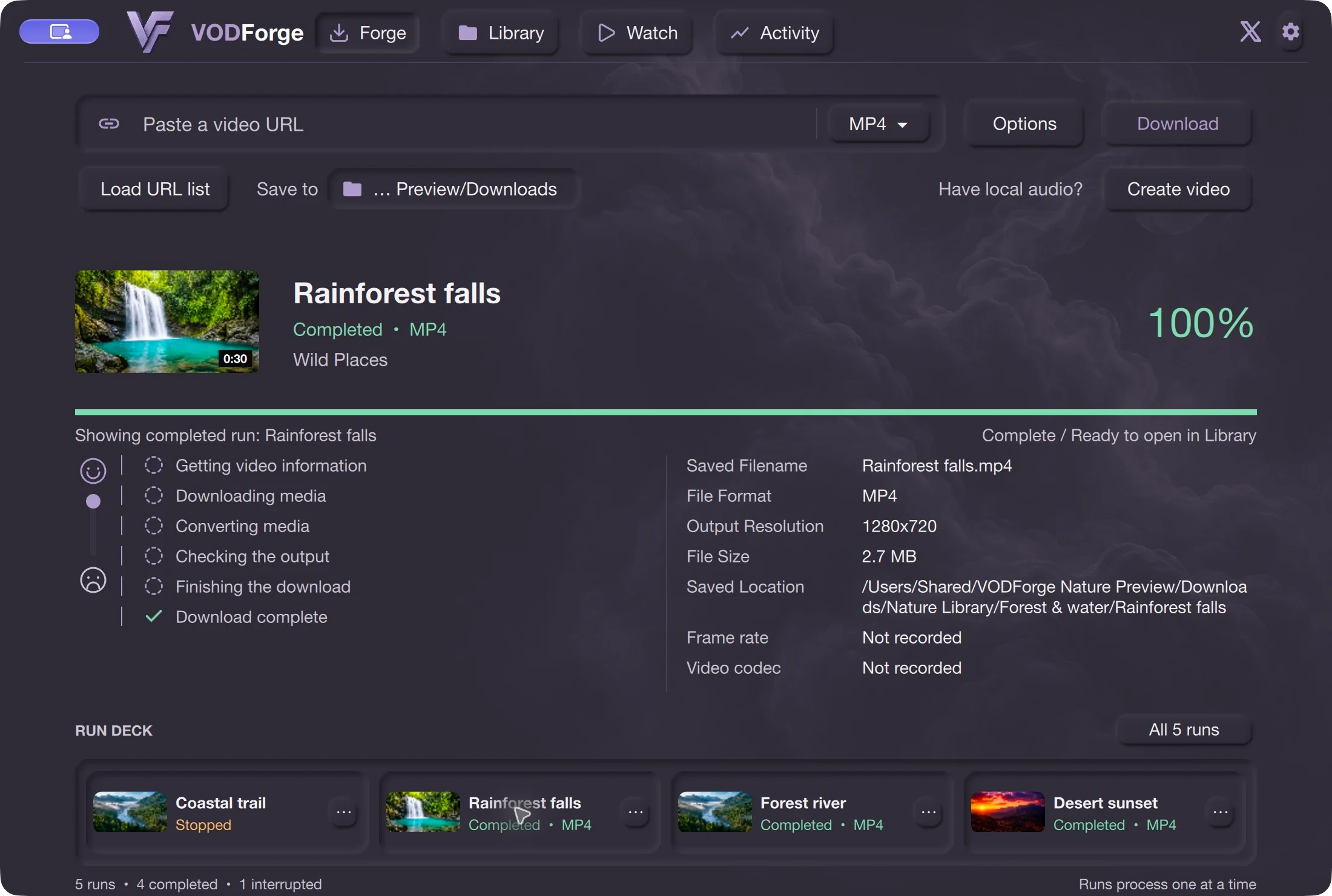
Step by step
01
Copy the playlist’s URL from YouTube. If you copy a video link inside it instead, keep the list= parameter so the playlist remains identified.
02
In Forge, paste the link and choose MP4, MP3, or Original audio. Use Save to to choose your destination. Open Settings (the gear icon) and make sure Ignore playlists is Off.
03
Choose Download. VODForge processes playlist items sequentially. Keep your computer awake and connected; a transfer can still need processing and validation before its file is ready.
04
Open Library and browse Playlists, or inspect individual runs in the Run Deck. Each successful item has its own output file. Check failed or unavailable items separately instead of treating the whole batch as complete.
The Library keeps saved playlists alongside channels, videos, and audio. You can return to a collection without remembering every filename. These are local files on your computer; the desktop app does not run a cloud download job for you.
See how the Library and folders fit together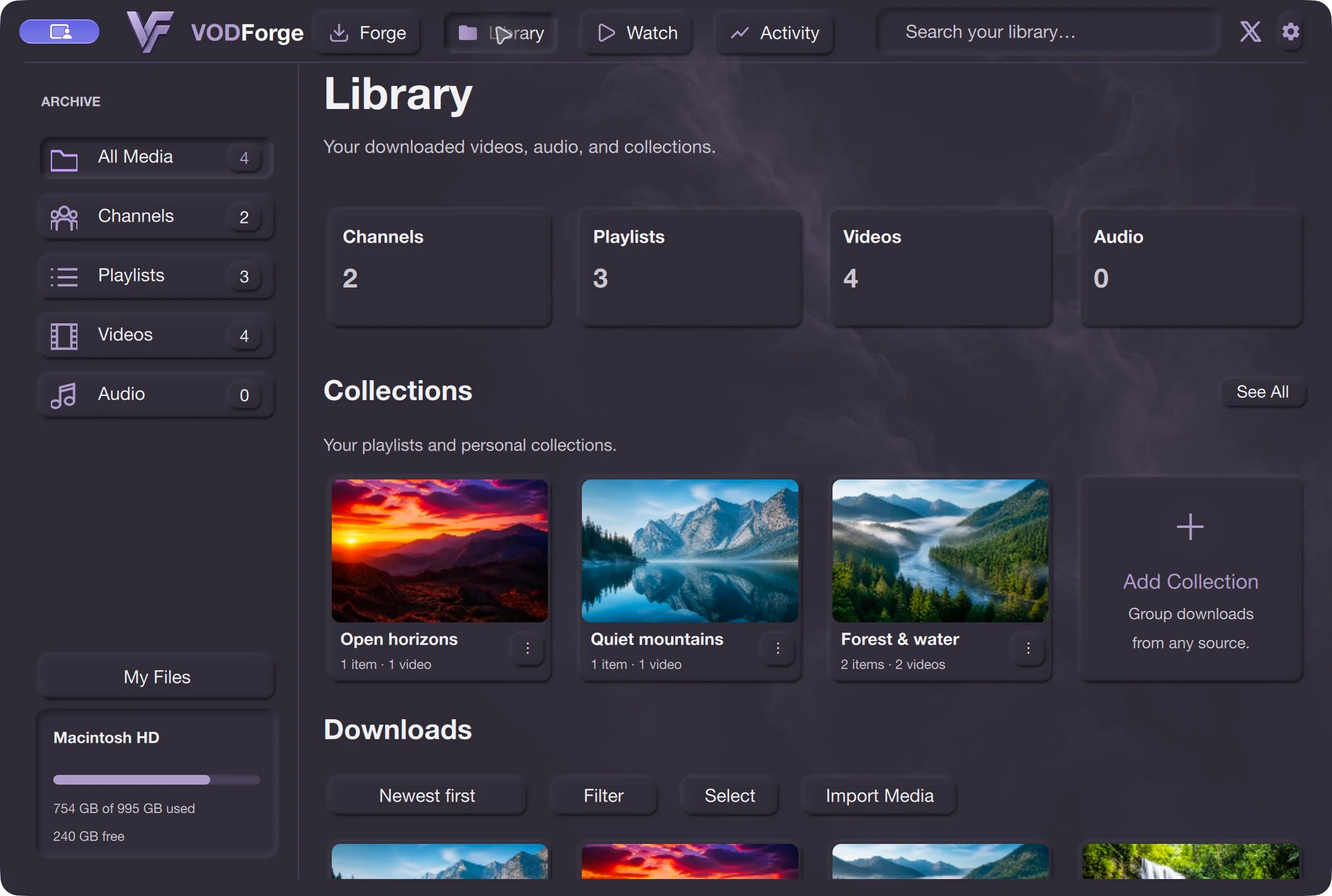
MP4 keeps video and audio together per item. MP3 creates audio files. Original audio keeps supported source audio without another lossy encode. A playlist is not automatically joined into one file.
Use Load URL list for a text file containing one URL per line. It is useful when your links are not already in a YouTube playlist. Check the destination and output settings before starting.
Save only content you are entitled to download and check the platform’s terms. Source availability, access restrictions, and provider changes can prevent downloads.
Check that Ignore playlists is Off in Settings and that the URL still identifies the playlist. A plain watch URL without list= may identify only one video.
No guarantee. Deleted, private, restricted, or unavailable items may fail. Inspect the individual results and save only items you are entitled to download.
This guide covers video links, playlist links, and URL lists. The Library’s channel grouping is an organization feature, not a promise to download every video from a channel.
Published release · VODForge 0.2.5
The published Apple Silicon package requires macOS 26 or newer; the Intel package requires macOS 15 or newer. These are bundled-binary requirements, not a full tested-device compatibility matrix. Windows 10/11, 64-bit. No desktop account required. Packaged releases include the tools they need.
macOS 26 or newer. Choose when About This Mac shows an Apple Chip.
VODForge-macOS-arm64-v0.2.5.zip
macOS 15 or newer. Choose when About This Mac shows an Intel Processor.
VODForge-macOS-x64-v0.2.5.zip
Use the installer for normal setup, or keep the portable ZIP’s contents together.
VODForge-Windows-Setup-v0.2.5.exe
Portable ZIPDeveloper ID signed and notarized on Mac; signed Windows packages. SHA-256 checksums · Published release notes · Privacy choices
Practical guides